







By Felix Lee, CEO at Forgecise | Published: May 19, 2026
- I. Functional Film Classification Matrix
- II. The Build Plate Interface: Shipping Film and Mechanical Interlocking
- III. LCD Screen Protectors vs. Polarizers: Hardening and Optical Optimization
- IV. Vat Release Films: Chemistry, Tensioning, and Release Dynamics
- V. FAQ: Top 5 Troubleshooting Inquiries from Print Farm Operators
- VI. Industrial Post-Processing, Yield Management, and Fleet Scalability
- VII. Strategic Operational Protocol for Enterprise Additive Farms
The financial success of stereolithography (SLA) and digital light processing (DLP) printing farms relies heavily on first-layer adhesion. In industrial settings, print failures mean more than just losing a few dollars of cheap polymer. They waste operator labor, cause machine downtime, consume expensive solvents, and wear out high-value parts like monochrome LCD screens.
At the root of these failures is often the mismanagement of the various plastic films that populate modern resin printers. To keep yield rates high and machines running longer, operators need to understand the physical and chemical properties of each layer—from build plate shipping liners to LCD screen protectors and vat release membranes.
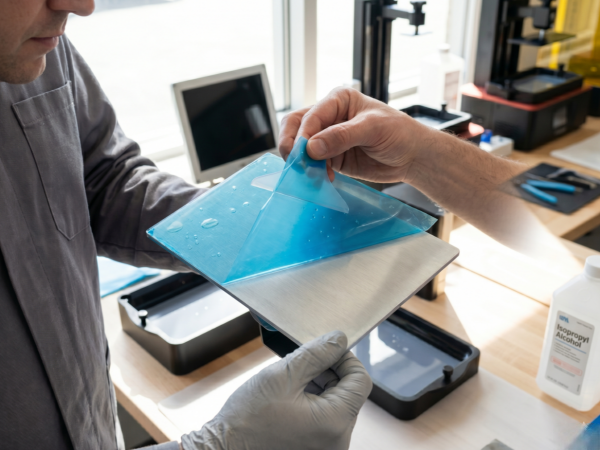
If you are setting up a new machine and asking, “Do you take the film off of a resin 3D printer plate?” The answer is yes. You must peel the shipping film from the metal build plate right after unboxing. If you leave it on, your first-layer yield will drop to 0%.
Below is the complete operational protocol for handling films and managing interface adhesion in enterprise additive manufacturing.
I. Functional Film Classification Matrix
To stop print failures before they happen, B2B operators must tell the difference between the functional films on a resin 3D printing system. This matrix breaks down their properties, how to handle them, and what happens when things go wrong.
| Film Type | Location | Material | Removal Required? | Primary Engineering Function | Operational Consequences of Incorrect Handling |
| Build Plate Shipping Film | Adhered to the aluminum/steel build plate surface. | Polyethylene (PE) or Polyethylene Terephthalate (PET). | Yes, immediately upon unboxing. | Prevents surface scratching and atmospheric oxidation during transit. | Complete adhesion failure. Cured photopolymer cannot bond to the low-surface-energy plastic film; resin remains cured on the vat floor. |
| LCD Screen Protector | Adhered directly over the exposure monochrome LCD. | Tempered Glass or Optical-grade PET. | No, replace only if damaged. | Shields the expensive LCD panel from mechanical scratches and accidental resin spills. | Screen Destruction. Removing the protector leaves the bare polarizer exposed to direct chemical bonding with spilled resin, causing permanent optical damage upon cleanup. |
| Vat Release Film (FEP, PFA, ACF) | Suspended at the bottom of the resin vat. | Fluorinated Ethylene Propylene (FEP) or Fluoropolymer-matte composite (ACF). | No (Keep Installed); however, temporary protective films on both sides of replacement sheets must be peeled off before installation. | Serves as the transparent bottom of the vat, allowing UV transmission while facilitating print release. | Poor Adhesion & Film Failure. Leaving temporary liners on severely reduces optical clarity, blocks UV light transmission, and causes rapid film tearing. |
II. The Build Plate Interface: Shipping Film and Mechanical Interlocking
The metallic build plate acts as the main anchor for the entire print. Good initial layer bonding happens through a process called mechanical interlocking. Liquid monomer flows into the tiny, rough cavities of a sand-blasted aluminum or laser-engraved steel plate. Once it polymerizes, the solid plastic locks physically to the metal face.
When operators forget to remove the clear or blue protective shipping film on newly unboxed machines (like the Elegoo Saturn series or Anycubic Photon systems), they completely block this interlocking process. The monomer touches only the smooth, chemically inert plastic film, which has extremely low surface energy.
We see this frequently across professional B2B forums. It acts almost like a “rite of passage” mistake. Operators run their brand-new machines for hours, only to find a perfectly clean build plate when the Z-axis lifts, while the cured test model sits flat at the bottom of the resin vat.
Sometimes, manufacturers apply the adhesive backing of these shipping films so tightly that it looks like a permanent scratch-resistant sheet. Operators have even sanded down their pristine build plates before realizing a secondary transparent film was there all along.
Bare Metal vs. Unremoved Shipping Film
| Interface Parameter | Bare Blasted/Laser-Engraved Metal | Unremoved Shipping Polymeric Film |
| Surface Energy | High (favorable wetting and chemical affinity). | Low (hydrophobic/oleophobic tendencies). |
| Micro-Texture Profile | Ra 1.6–3.2 µm (provides mechanical anchoring). | Ra < 0.1 µm (virtually smooth surface). |
| First-Layer Yield | > 99% under optimal UV exposure settings. | 0% (immediate delamination during Z-lift). |
| Chemical Wear Resistance | Highly resistant to standard cleaning solvents (IPA/TPM). | Susceptible to swelling, peeling, and adhesive degradation. |
III. LCD Screen Protectors vs. Polarizers: Hardening and Optical Optimization
The monochrome LCD screen remains the most vulnerable and costly consumable part of any resin 3D printer. It transmits the exact pixel pattern of UV light needed to cure each layer of photopolymer resin.
You must know the difference between the temporary shipping film covering the LCD screen—which you remove to stop optical scattering—and the permanent or aftermarket screen protector, which stays in place to guard against resin spills.
Critical Warning: Many printers come with a factory-installed polarizer film directly beneath the outer protective layer. If you mistakenly peel off this polarizer, you will destroy the screen’s ability to block UV light. The panel will become useless, and you will void your manufacturer’s warranty.
The financial cost of LCD damage in a high-volume B2B farm adds up quickly. A single resin leak from a ruptured vat membrane can bond straight to an unprotected LCD glass panel. If you try to scrape away that cured resin without a buffer sheet, you almost always scratch the glass or tear the polarizer. That means a full screen replacement, costing upwards of $150 in parts plus hours of maintenance labor.
Installing high-quality, optical-grade tempered glass or PET screen protectors is a proven, low-cost way to mitigate this risk. They keep full optical transparency and resist yellowing over time, ensuring your light path stays uniform and your curing resolution remains sharp.
IV. Vat Release Films: Chemistry, Tensioning, and Release Dynamics
The vat release film forms the transparent floor of the resin vat, separating the liquid photopolymer from the LCD screen below. It has to handle repeated mechanical peel forces every time the Z-axis raises a newly cured layer off the bottom.
Industry setups primarily use Fluorinated Ethylene Propylene (FEP), Perfluoroalkoxy (PFA, commonly called nFEP), and Fluoropolymer-matte composite (ACF) films. When you install replacement membranes, you must peel the protective liners from both sides of the new sheet. Leaving these temporary layers on causes poor UV light transmission and a massive loss of print detail.
Proper installation also demands precise tensioning. You must install traditional FEP films using a spacer, like a 13 mm bottle cap, to give the film enough elasticity. Too much tension causes the film to tear early. Too little tension stops the film from snapping cleanly away from the cured resin, ruining the print.
High-speed ACF membranes introduced a textured matte side that faces the liquid resin. This texture cuts down suction forces and allows for much shorter Z-axis lift distances.
Release Film Material Comparison
| Parameter | Fluorinated Ethylene Propylene (FEP) | Perfluoroalkoxy (PFA / nFEP) | Fluoropolymer-Matte (ACF) |
| Elasticity & Flexibility | High (requires 8–10 mm lift distance). | Moderate (smoother release profile). | Low (allows high speed, 4–5 mm lift distance). |
| Surface Finish | Glossy (highly transparent). | Glossy (low friction coefficient). | Matte on resin-facing side (minimizes vacuum seal). |
| Suction Force | High (creates a physical vacuum pull). | Moderate (reduced adhesion). | Exceptionally Low (allows up to 2x lift speed). |
| Average Service Life | ~20,000 to 30,000 cured layers. | ~40,000 cured layers. | > 50,000 cured layers under optimal tension. |
V. FAQ: Top 5 Troubleshooting Inquiries from Print Farm Operators
We analyzed the most discussed technical inquiries across professional additive manufacturing forums like Reddit and Quora to bring you these solutions.
1. The “Blue Film” Build Plate Dilemma
Problem: New operators frequently encounter complete print failure on newly unboxed Anycubic or Elegoo systems. They are unsure whether to peel off the blue or clear plastic layer adhered to the metal build plate, assuming it protects the aluminum from scratches during post-processing.
Short Answer: Yes, peel it off immediately before printing.
Authoritative Solution: This film acts strictly as a temporary shipping liner. If you try to print with it attached, the liquid monomer cannot reach the micro-textured metal surface. Mechanical interlocking fails completely, and the cured resin bonds to the FEP film at the bottom of the vat instead. Grab a plastic scraper, lift one corner of the film, and peel it off entirely to expose the raw metal surface.
2. Unexplained Build Plate Snapping and Violent Z-Axis Upward Jerks
Problem: Operators using mid-to-large-format printers (like the Anycubic Photon M3 Max) hear the build plate make a loud, violent popping sound when lifting after the base layers cure. This sudden jerk splashes resin onto the Z-axis rails.
Short Answer: This happens because of excessive suction between the cured base layers and the vat release film.
Authoritative Solution: You are dealing with a high vacuum force. To fix this, adjust three key parameters:
- Bottom Layer Exposure: Drop the bottom layer exposure time by 10% to 15% (usually from 45 seconds to 35–38 seconds). This stops the resin from over-curing and gripping the FEP too tightly.
- Z-Axis Lift Speed: Slow the initial lift velocity to 40 mm/min. This lets the release film peel away smoothly instead of snapping.
- Resin Temperature: Keep the resin between 25°C and 30°C using a vat heating belt. Cold resin is thick and drives suction forces way up.
3. False Consumable Alerts vs. Actual Release Film Wear
Problem: Users of advanced printers with built-in monitoring systems, such as the Elegoo Saturn series, receive system prompts to replace the release film even when the membrane looks clear and prints finish perfectly.
Short Answer: Treat these alerts as reminders to look at the film, not as strict rules to throw it away.
Authoritative Solution: Modern printer firmware uses basic, linear layer-counting algorithms (often triggering at 30,000 layers) rather than checking the actual physical condition of the film. You only need to replace the film if you see physical wear. Look for deep creases, puncture marks, heavy clouding that blocks light, or a loss of tension causing print failures. If the film looks healthy, simply reset the software counter on the touch screen and keep printing.
4. Localized Failure Divergence (The “Scrooge McFail” Phenomenon)
Problem: On a build plate loaded with identical models, a single print near the center of the plate fails and sticks to the FEP film, while the outer prints finish without issue.
Short Answer: The center of your vat film stretches more than the edges, like a trampoline, stopping the part from peeling off.
Authoritative Solution: The release film locks down tight along its outer metal frame, making it stretch the most right in the geometric center. When the Z-axis lifts, it might not rise high enough to beat this local elasticity. The resin never actually peels away from the film before the next layer starts. Fix this by raising the Z-axis lift distance by 1–3 mm. Also, try placing larger or high-suction models closer to the rigid outer edges of the plate, and use heavy anchor supports on the initial print islands.
5. Screen Protector Bubbles and Resin Leakage Risks
Problem: Operators worry that trapped air bubbles or minor misalignments during the installation of an aftermarket LCD screen protector will cause curing defects or print failures.
Short Answer: Tiny bubbles will not hurt your prints, but poorly sealed edges will destroy your screen.
Authoritative Solution: Small, isolated air bubbles (1–2 mm across) do not scatter UV light enough to alter print quality because the LED matrix emits highly collimated light. You should still remove large bubbles or trapped dust to stop localized optical distortion. The real danger comes from bad edge sealing. If you misalign the protector or forget to tape the outer borders, liquid resin can wick right beneath it via capillary action. Once the UV light fires, that trapped resin cures and bonds the protector permanently to your polarizer. Always clean the screen with 95% IPA and a microfiber cloth, align it perfectly, and seal the entire perimeter with black electrical tape.
VI. Industrial Post-Processing, Yield Management, and Fleet Scalability
Running a commercial print farm means setting up a smart post-processing workflow to cut labor costs, protect your machines, and push out more parts. High-volume B2B setups need to step away from manual part scraping and basic washing routines, which waste time and often break parts.
Swapping out standard plates for flexible print platforms, like the Formlabs Build Platform 2 or aftermarket spring-steel magnetic plates, speeds up the workflow. The Formlabs Build Platform 2 uses a flexible steel print surface with integrated part release paddles. Operators can pop completed prints off instantly without using sharp metal scrapers, completely removing the risk of gouging the aluminum build plate or snapping delicate supports.
The Two-Stage Washing System Workflow:
To stretch your solvent supply further, adopt a two-stage washing routine.
- 1st Stage: Bulk Resin Pre-Wash (Dirty Solvent). Instead of dropping resin-coated parts straight into a clean wash station, submerge them first in a “dirty” pre-wash bath of older Isopropyl Alcohol or Tripropylene Glycol Monomethyl Ether (TPM). This strips away the bulk of the wet resin.
- 2nd Stage: Automated Fine Wash (Clean Solvent). Move the parts to an automated wash station filled with clean solvent for the final rinse.
This simple split keeps your primary solvent clean for much longer, dropping overall solvent use by up to 50%. You can recycle the dirty pre-wash solvent by exposing it to UV light to harden the suspended resin, then filtering it through a gravity-fed ceramic filter to get the clarity back. Always let the solvent dry fully to avoid surface marks before moving to the final UV post-curing phase.
VII. Strategic Operational Protocol for Enterprise Additive Farms
To keep production standards high and eliminate downtime across a fleet of industrial resin 3D printers, facilities should stick to a strict preventative maintenance schedule.
| Maintenance Frequency | Target Component | Action Required | Expected Outcome |
| Every Print Cycle | Build Plate. | Scrape the surface with a plastic blade to check for cured fragments; wipe with 90%+ IPA. | Prevents the build plate from crushing solid debris against the LCD screen on the next homing sequence. |
| Every Print Cycle | Resin Vat. | Stir the liquid resin to eliminate pigment settling; inspect the release film for cloudiness or debris. | Ensures uniform curing and prevents localized underexposure from pigment settling. |
| Weekly | Z-Axis Lead Screw. | Clean off old grease and debris with a lint-free cloth; apply a thin coating of lithium grease. | Eliminates mechanical binding, reducing layer lines and vertical artifacts. |
| Weekly | LCD Screen. | Clean the screen with 95% alcohol and a microfiber cloth; run an LED test to check for dead pixels. | Detects LCD degradation early, preventing print failures from uneven light output. |
| Monthly | Cooling Filters. | Vacuum the intake mesh filters and clean the rear cooling fans of dust buildup. | Prevents internal components from overheating, extending the lifespan of the UV light engine. |
| Monthly | Build Plate Texture. | Check the flatness of the plate; lightly sand with 220-grit wet sandpaper if the surface has become too smooth. | Restores the mechanical texture of the plate, maintaining high first-layer adhesion. |
By sticking to these standard procedures, manufacturing facilities can drastically cut down on print failures, waste less material and solvent, and squeeze the maximum working life out of their additive manufacturing equipment.